Werkzeuge bauen
3. Dezember 2026 · 10:30–12:00 CET / 15:00–16:30 IST · 90 Minuten
Wähle eine Aufgabe. Entwickle ein eigenes Gestaltungswerkzeug in Google AI Studio. Nutze Material aus dem gemeinsamen Drive oder eigene Beiträge.
Ablauf
- 10 Min. · Beispiele ansehen und kurz selbst recherchieren.
- 10 Min. · Eigene Idee formulieren und den Startprompt anpassen.
- 45 Min. · Werkzeug bauen, ausprobieren und verbessern.
- 15 Min. · Zwei bis drei eigene Ergebnisse erzeugen.
- 10 Min. · Veröffentlichen, Link eintragen und Ergebnisse hochladen.
Google AI Studio · Gemeinsames Material
Wähle eine der zwölf Aufgaben
Brik Gallery · Weitere interaktive Gestaltungswerkzeuge zum Entdecken und Ausprobieren.
Text
Tools zum Ausprobieren: TEXTR (Buchstaben als verteilbare Vektorformen.) · Space Type Generator (Text in bewegten räumlichen Anordnungen.)
T01 · Textfassungen setzen
Setze einen Truism in veränderbaren Textfeldern. Regle Satzbreite und Zeilenabstand.
Beispiel: Derselbe Satz als schmale Spalte, breite Zeile und dichter Textblock.
Vokabular: Satzbreite (text measure), Zeilenabstand (leading), Umbruch (line break)
Startprompt
Baue eine Browser-Textwerkstatt. Ich kann eigene Texte einfügen, Satzbreite und Zeilenabstand getrennt einstellen und die fertige Grafik als PNG exportieren. Zeige Änderungen sofort.
T02 · Einzelzeichen gestalten
Verändere Breite, Abstand und Grundlinie einzelner Buchstaben in einem Wort.
Beispiel: Ein Wort mit wechselnden Zeichenbreiten und verschobenen Grundlinien.
Vokabular: Zeichenbreite (glyph width), Laufweite (tracking), Grundlinie (baseline)
Startprompt
Baue ein Browser-Satzwerkzeug. Ich gebe ein Wort ein und wähle einzelne Buchstaben aus. Regle Breite, Abstand und vertikale Position pro Buchstabe. Exportiere das Ergebnis als PNG.
T03 · Text bewegen
Animiere einen Text mit einstellbarem Tempo und anhaltbarer Bewegung.
Beispiel: Ein Truism, dessen Wörter nacheinander auseinanderdriften.
Vokabular: Zeitversatz (time offset), Bewegungsweite (amplitude), Schleife (loop)
Startprompt
Baue einen kinetischen Textgenerator mit eigener Texteingabe. Animiere die Position der Wörter. Regle Tempo und Bewegungsweite, pausiere an einem beliebigen Zeitpunkt und exportiere diesen Frame als PNG.
Typografie
Tools zum Ausprobieren: BitFontMaker2 (Eigene Glyphen auf einem Pixelraster zeichnen.)
Y01 · Zeichenfamilie entwickeln
Zeichne eigene Buchstabenformen und entwickle daraus wenige zusammengehörige Glyphen.
Beispiel: Drei Buchstaben aus demselben geometrischen Konstruktionsprinzip.
Vokabular: Glyphe (glyph), Rasterzelle (grid cell), Negativform (negative space)
Startprompt
Baue einen Glyphen-Editor mit einem editierbaren Raster. Ich zeichne drei eigene Buchstaben, speichere sie und setze daraus eine Zeichenfolge. Exportiere die Formen als SVG.
Y02 · Schriftkonturen verformen
Ziehe an einzelnen Stellen einer Buchstabenkontur. Stelle Einflussradius und Stärke ein.
Beispiel: Ein Wort, dessen Konturen sich an zwei Stellen dehnen.
Vokabular: Kontur (outline), Einflussradius (influence radius), Verformung (warp)
Startprompt
Baue ein Werkzeug, das meinen Text in veränderbare Buchstabenkonturen umwandelt. Ziehe mit der Maus an einem Punkt; einstellbare Stärke und Radius bestimmen die Verformung. Biete Reset und SVG-Export.
Y03 · Schriftkörper formen
Erzeuge räumliche Schrift und ändere ihr Profil oder ihre Tiefe.
Beispiel: Drei Schriftkörper mit flachem, dickem und verdrehtem Profil.
Vokabular: Extrusion (extrusion), Profil (profile), Verdrehung (twist)
Startprompt
Baue einen einfachen 3D-Schriftgenerator aus meiner Texteingabe. Regle Extrusionstiefe und Verdrehung, drehe die Ansicht und exportiere den gewählten Blick als PNG.
Bild
Tools zum Ausprobieren: KLON (Bildausschnitte als veränderbare Pinsel.) · Tooooools (Bilder durch Rasterung und Verzerrung bearbeiten.) · Mosh-Pro Studio (Glitch, Verschiebung und zeitbasierte Bildoperationen.)
B01 · Bilder lokal verformen
Lade ein Bild und verforme einen ausgewählten Bereich mit einem Pinsel.
Beispiel: Ein Gesichtsfoto mit lokal verschobenen Bildbereichen.
Vokabular: Pixelverschiebung (displacement), Pinselradius (brush radius), Einflussstärke (strength)
Startprompt
Baue ein Browser-Bildwerkzeug mit lokalem Bildimport. Ich ziehe Pixel mit einem Pinsel in eine Richtung; Radius und Stärke sind einstellbar. Biete Reset und PNG-Export.
B02 · Mit Bildfragmenten zeichnen
Wähle einen Bildausschnitt als Pinselspitze. Ändere Größe und Abstand der Abdrücke.
Beispiel: Eine Linie aus wiederholten Ausschnitten eines Plakats.
Vokabular: Quellausschnitt (source crop), Abdruck (stamp), Intervall (spacing)
Startprompt
Baue einen Collage-Pinsel. Ich lade ein Bild, wähle einen Ausschnitt und zeichne damit wiederholte Abdrücke. Größe und Abstand sind einstellbar. Exportiere die Collage als PNG.
B03 · Kopien verändern
Erzeuge eine Folge von Kopien. Jede Kopie wird verschoben, gedreht oder verändert.
Beispiel: Ein Bild, das sich über mehrere Abzüge zunehmend auflöst.
Vokabular: Rekursion (recursion), Registerversatz (offset), Generation (generation)
Startprompt
Baue eine Kopiermaschine. Lade mein Bild und erzeuge mehrere Kopien, bei denen jede aus der vorherigen entsteht. Regle Versatz, Rotation und Anzahl. Exportiere die gewählte Generation als PNG.
Elemente und Formen
Tools zum Ausprobieren: SuperShapes (Geometrien aus veränderbaren Formparametern.)
E01 · Formfamilie generieren
Entwickle eine geometrische Konstruktion mit einstellbaren Proportionen und Aussparungen.
Beispiel: Sechs Zeichen aus einem gemeinsamen Raster.
Vokabular: Proportion (proportion), Wiederholung (repetition), Aussparung (cut-out)
Startprompt
Baue einen Formgenerator mit einer selbst gewählten geometrischen Grundform. Regle Proportionen, Wiederholung und Aussparung. Erzeuge sechs Varianten und exportiere ausgewählte Formen als SVG.
E02 · Räumliche Formen kombinieren
Ordne mehrere einfache 3D-Formen an und verändere ihre Oberflächen.
Beispiel: Eine Gruppe aus Körpern mit einem eigenen Bild als Oberfläche.
Vokabular: Transformation (transform), Textur (texture), Perspektive (perspective)
Startprompt
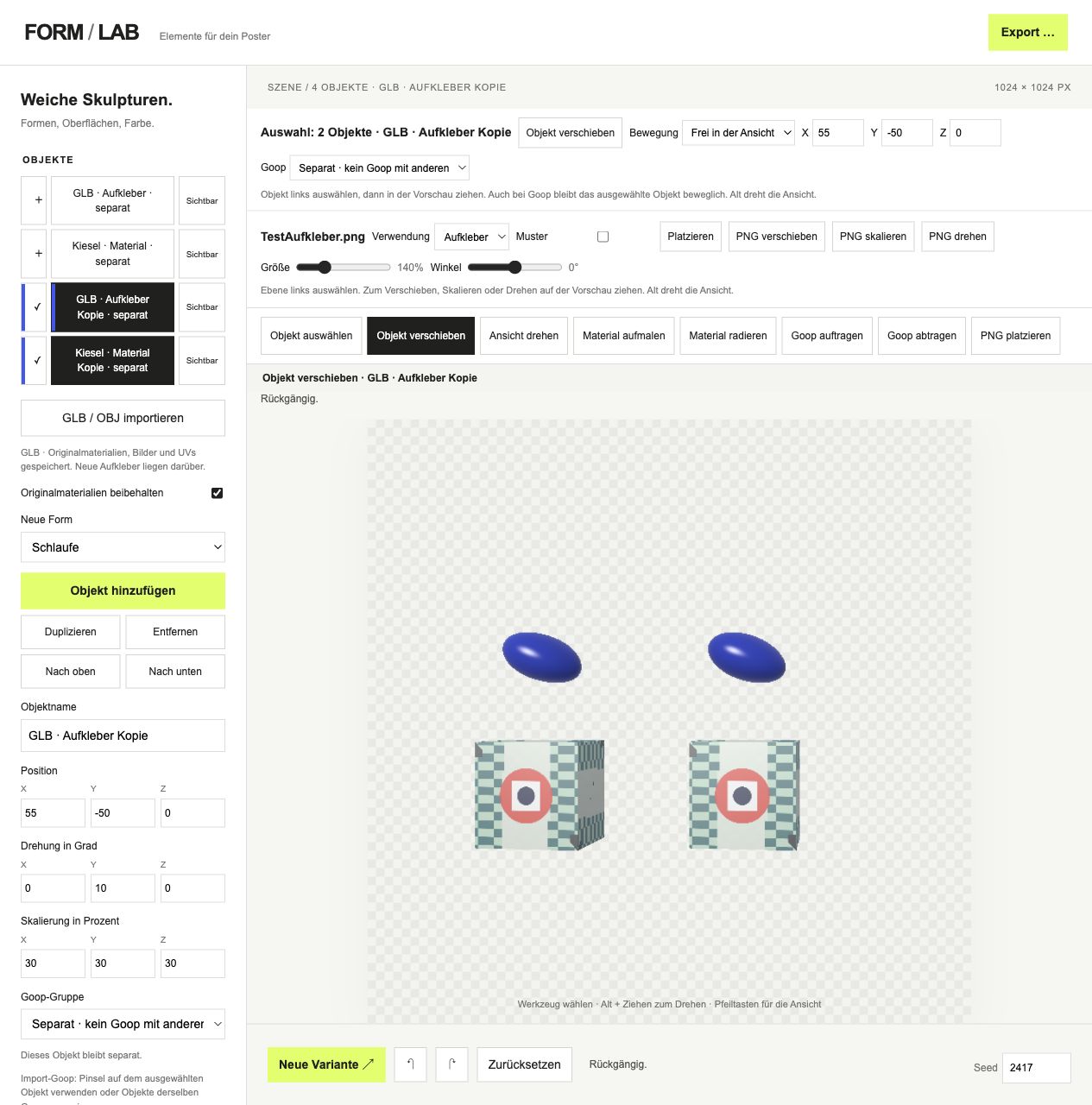
Baue ein kleines 3D-Tool mit Kugel, Würfel und Zylinder. Ich platziere und skaliere die Körper, ändere ihre Farben und kann optional ein Bild als Textur auflegen. Exportiere die Ansicht als PNG.
E03 · Reliefs zeichnen
Zeichne einen Verlauf und variiere Höhe und Breite seines Reliefprofils.
Beispiel: Eine gezeichnete Linie als flache und als plastische Form.
Vokabular: Pfad (path), Höhenprofil (height profile), Querschnitt (cross-section)
Startprompt
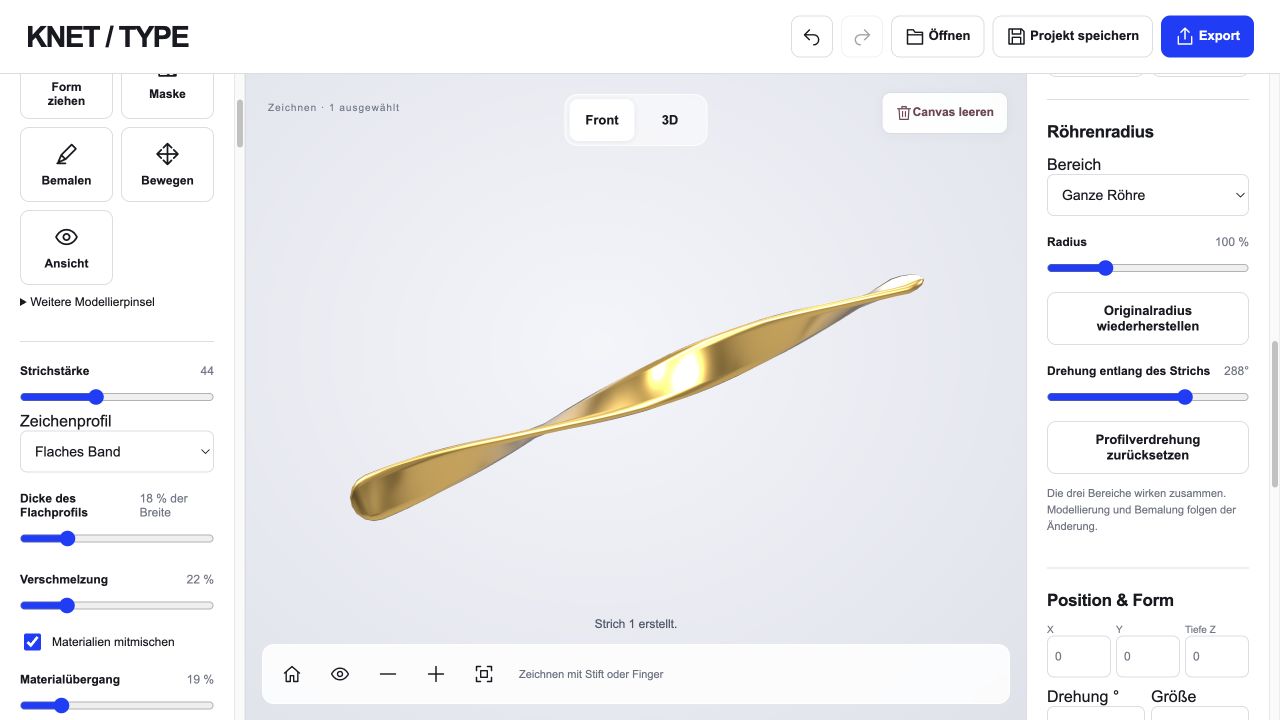
Baue einen einfachen Reliefgenerator. Ich zeichne eine Linie, aus der ein räumlicher Strich entsteht. Regle Höhe und Breite, rotiere die Ansicht und exportiere sie als PNG.
Bildbeispiele
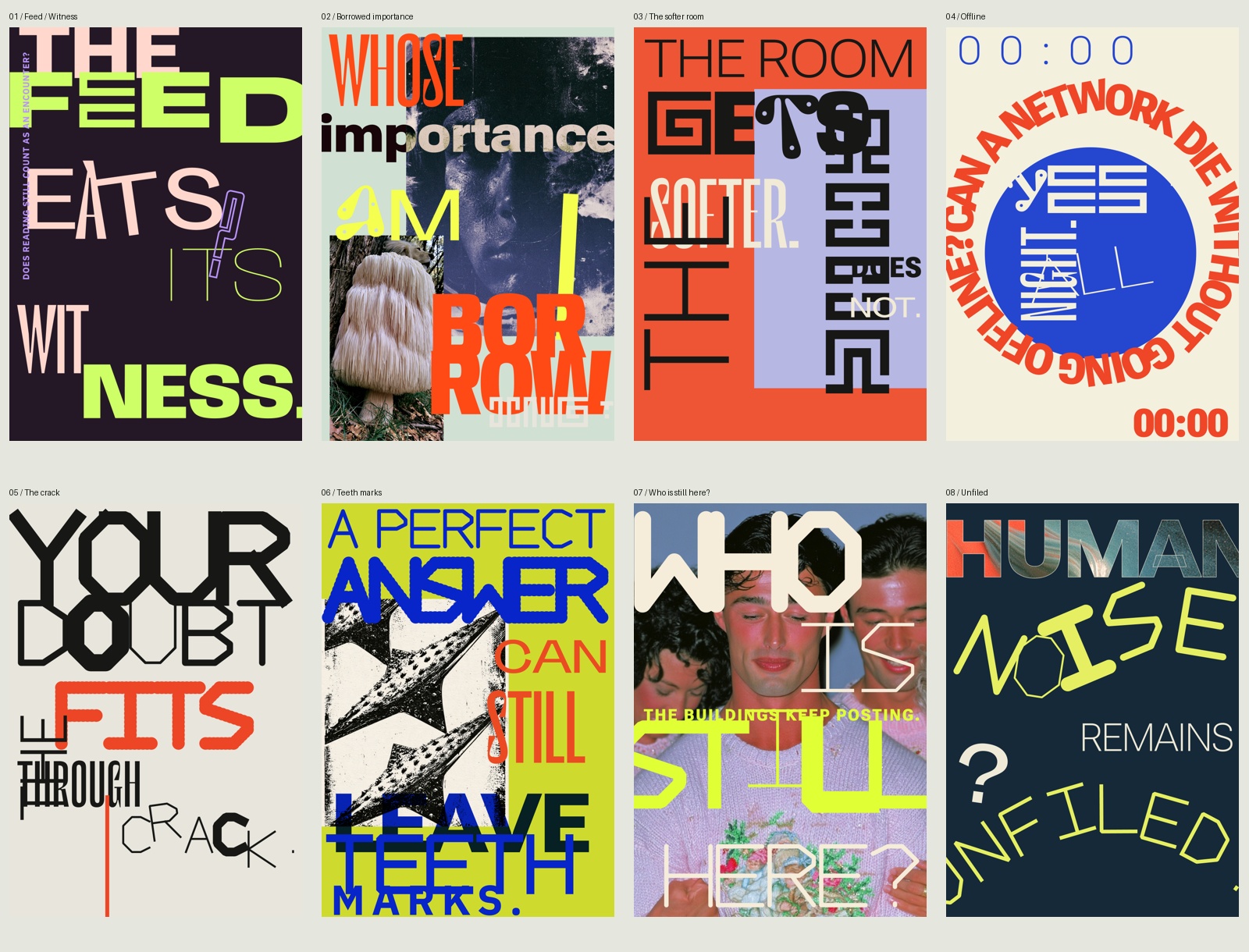
Satzlabor 77
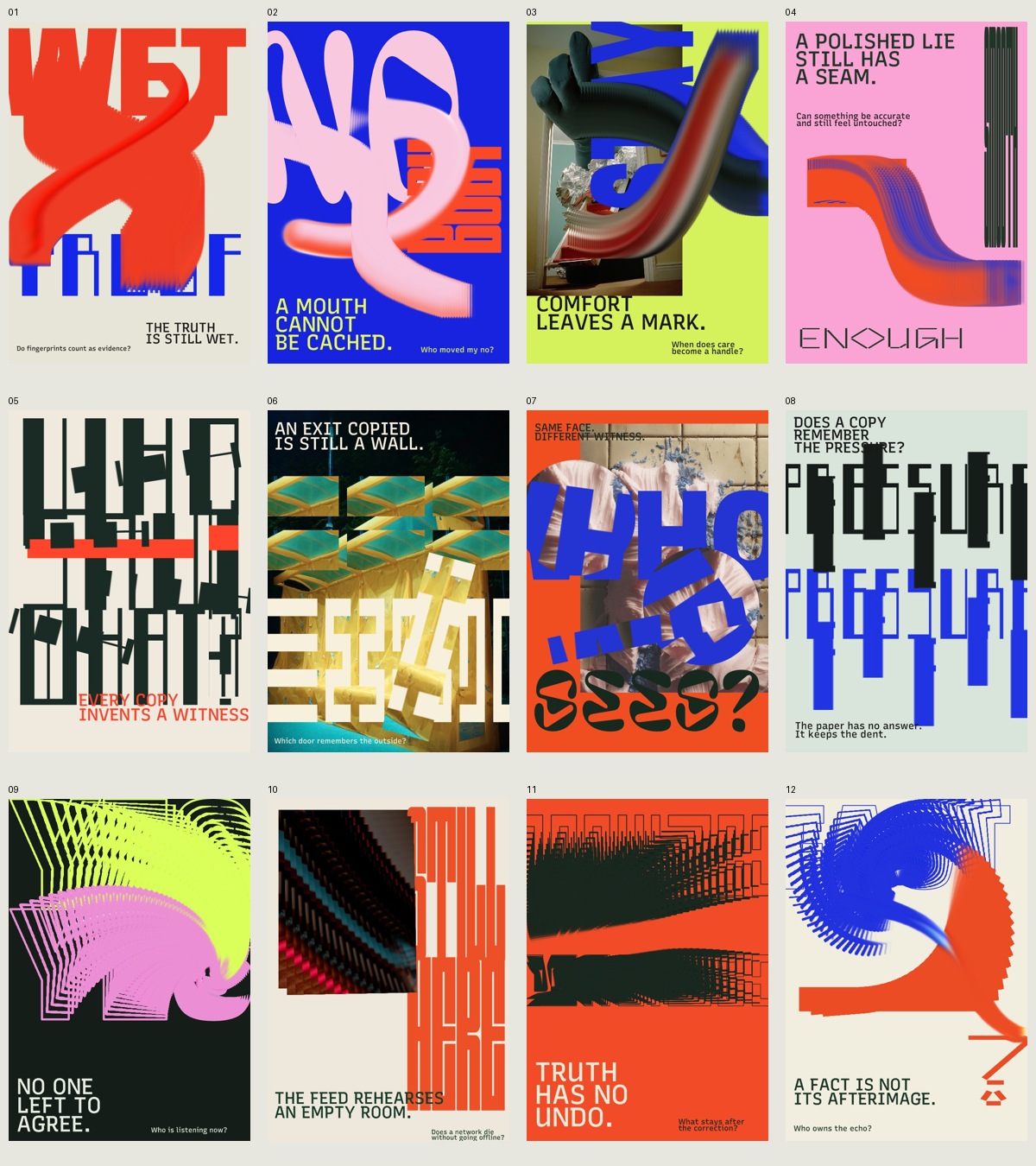
ABRIEB 76
KNET / TYPE
FORM / LAB
Abgabe
- Veröffentliche dein Werkzeug und prüfe, ob eine andere Person es öffnen kann.
- Trage Namen, Hochschule, Toolname, veröffentlichten Link und Funktion in das Google Sheet ein. Nutze eine Zeile pro Tool; wähle den passenden inhaltlichen Bereich.
- Lade zwei bis drei Ergebnisse in den passenden Ausstellungsordner hoch. Benenne die Dateien mit Name und Toolname.
Tool in Google Sheet eintragen
Ergebnisse in Google Drive hochladen
Weiterarbeiten
Entwickle dein Tool weiter, recherchiere eigene Referenzen und gestalte mit den Beiträgen anderer Studierender.
Build a tool
3 December 2026 · 10:30–12:00 CET / 15:00–16:30 IST · 90 minutes
Choose one task. Develop your own design tool in Google AI Studio. Use material from the shared Drive or your own contributions.
Schedule
- 10 min · Study examples and do some research.
- 10 min · Formulate your own idea and adapt the starter prompt.
- 45 min · Build, test and refine your tool.
- 15 min · Create two or three outputs.
- 10 min · Publish, register your link and upload your outputs.
Google AI Studio · Shared material
Choose one of the twelve tasks
Brik Gallery · Explore more interactive design tools.
Text
Tools to try: TEXTR (Letters distributed as vector shapes.) · Space Type Generator (Text in animated spatial arrangements.)
T01 · Typeset text versions
Typeset a truism in editable text fields. Control line width and line spacing.
Example: The same sentence as a narrow column, a wide line and a dense text block.
Vocabulary: text measure, leading, line break
Starter prompt
Build a browser typesetting tool. Let me paste my own text, adjust line width and line spacing independently, and export the graphic as PNG. Show changes live.
T02 · Shape individual letters
Adjust the width, spacing and baseline of individual letters in a word.
Example: A word with alternating character widths and shifted baselines.
Vocabulary: glyph width, tracking, baseline
Starter prompt
Build a browser type editor. Let me enter a word, select individual letters, and adjust width, spacing and vertical position per letter. Export the result as PNG.
T03 · Animate text
Animate text with adjustable speed and a pause control.
Example: A truism whose words drift apart in sequence.
Vocabulary: time offset, amplitude, loop
Starter prompt
Build a kinetic text generator with custom text input. Animate word positions. Adjust speed and movement range, pause at any time and export that frame as PNG.
Typography
Tools to try: BitFontMaker2 (Draw your own glyphs on a pixel grid.)
Y01 · Develop a glyph family
Draw original letterforms and develop a small family of glyphs.
Example: Three letters derived from the same geometric construction.
Vocabulary: glyph, grid cell, negative space
Starter prompt
Build a glyph editor with an editable grid. Let me draw three original letters, save them and assemble a sequence from them. Export the shapes as SVG.
Y02 · Deform type contours
Pull selected points on letter outlines. Adjust influence radius and strength.
Example: A word with outlines stretched in two places.
Vocabulary: outline, influence radius, warp
Starter prompt
Build a tool that converts my text into editable letter outlines. Drag a point with the mouse; adjustable strength and radius control the deformation. Include reset and SVG export.
Y03 · Shape spatial type
Build spatial lettering and modify its profile or depth.
Example: Three letterforms with flat, thick and twisted profiles.
Vocabulary: extrusion, profile, twist
Starter prompt
Build a simple 3D type generator from my text input. Adjust extrusion depth and twist, rotate the view and export the selected view as PNG.
Image
Tools to try: KLON (Image crops as adjustable brushes.) · Tooooools (Process images with raster patterns and distortion.) · Mosh-Pro Studio (Glitch, displacement and time-based image operations.)
B01 · Deform image regions
Load an image and deform a selected region with a brush.
Example: A portrait with locally displaced image regions.
Vocabulary: displacement, brush radius, strength
Starter prompt
Build a browser image tool with local image import. Let me drag pixels in a direction using a brush with adjustable radius and strength. Include reset and PNG export.
B02 · Draw with image fragments
Use an image crop as a brush tip. Change stamp size and spacing.
Example: A line made from repeated fragments of a poster.
Vocabulary: source crop, stamp, spacing
Starter prompt
Build a collage brush. Let me import an image, select a crop and paint repeated stamps with it. Adjust size and spacing. Export the collage as PNG.
B03 · Transform successive copies
Generate a sequence of copies. Offset, rotate or alter each copy.
Example: An image that gradually breaks apart across successive copies.
Vocabulary: recursion, offset, generation
Starter prompt
Build a copy machine. Import my image and generate copies, each derived from the preceding one. Control offset, rotation and count. Export the selected generation as PNG.
Elements and shapes
Tools to try: SuperShapes (Generate geometry from adjustable shape parameters.)
E01 · Generate a shape family
Develop a geometric construction with adjustable proportions and cut-outs.
Example: Six symbols derived from one grid.
Vocabulary: proportion, repetition, cut-out
Starter prompt
Build a shape generator with a geometric base shape of my choice. Adjust proportions, repetition and cut-outs. Generate six variants and export selected shapes as SVG.
E02 · Combine spatial forms
Arrange simple 3D shapes and modify their surfaces.
Example: A group of objects with your own image as a surface.
Vocabulary: transform, texture, perspective
Starter prompt
Build a small 3D tool with a sphere, cube and cylinder. Let me position and scale the objects, change their colours and optionally apply an image texture. Export the view as PNG.
E03 · Draw reliefs
Draw a path and vary the height and width of its relief profile.
Example: A drawn line as a flat and a raised form.
Vocabulary: path, height profile, cross-section
Starter prompt
Build a simple relief generator. Let me draw a path that becomes a raised stroke. Adjust height and width, rotate the view and export it as PNG.
Visual examples
Satzlabor 77
ABRIEB 76
KNET / TYPE
FORM / LAB
Submit your work
- Publish your tool and check that someone else can open it.
- Enter names, institution, tool name, published URL and function in the Google Sheet. Use one row per tool and select the appropriate content area.
- Upload two or three outputs to the appropriate exhibition folder. Include your name and tool name in the filenames.
Register your tool in Google Sheet
Upload outputs to Google Drive
Continue working
Develop your tool further, research your own references and work with contributions from other students.